
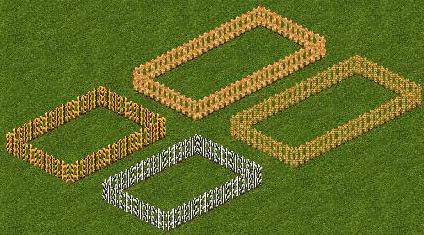
Updated May 20, 2006 by Jay to remove the patch program. Patch programs have been known to cause sporadic game crashes with the expansion packs. The messages for the fences are now in the ZKL Combined dll File. The Animal Print Fences ".ztd" file has not changed.
zip size: 33.2 KB
current ztd date: August 10, 2002
Download the Animal Print Fences here.
Download the most recent dll here.
(The dll file date must be May 14, 2006 or newer.)
For more info on the dll file, go here.
To Install:
1) Move the ".ztd" file to your Zoo Tycoon Updates folder
(for example, C:\Program Files\Zoo Tycoon\Updates).
2) Download the ZKL Combined dll file and extract it to your Zoo Tycoon folder
(for example, C:\Program Files\Zoo Tycoon).
3) If you downloaded a previous version of the Animal Print Fences that had a Patch program with it and if you ran that Patch program, it is important to copy lang0.dll from your Zoo Tycoon CD-ROM to replace the lang0.dll that was changed in the Zoo Tycoon folder by that Patch program. Also, if you have any ".dll" file with "Animal Fences" or with "backup" in its name (such as "Lang0 Backup.dll") in your Zoo Tycoon folder, delete those files.
